propertyCOMPANION — for property owners with an in-house maintenance team

See what's happening with your buildings.

Your whole portfolio in one building log: every report, every job done, every receipt — every euro assigned to a house. Your people talk it in by voice message, the system does the sorting. No location tracking, no stopwatch: self-reporting. For businesses that work with their own caretakers and employed tradespeople.

Get in touch What it costs

Everything stays in memory — on your own server.

What it can do

3 roles

Boss, back office, field — everyone sees their own.

No overhead

0 forms

Reporting happens by voice message.

Data sovereignty

1 place for your buildings

Your own server.

Limits first

An agent with limits.

Many AI agents are given access to everything and are then supposed to stick to rules. Your propertyCOMPANION gets its limits first, in the code.

Money only on the dashboard.

The chat can neither grant nor confirm approvals. Such requests become a draft on the approvals page.

Everyone sees their own.

Boss, office and field have their own views, the field without any money figures.

No tracking, no stopwatch.

Your people say what they did. Nothing is measured.

It asks instead of guessing.

If something is ambiguous, it asks. Anything unclear becomes a note to the office.

Written once, only added to.

No entry is overwritten; the history stays complete.

No acting on the web.

No browser, no purchases, no forms, no payments. It installs no software, and it can neither download nor run programs from the internet.

One stop is enough.

A stop command in the chat halts it at once.

How the industry runs today

A quick ask, WhatsApp, a yellow sticky note —
afterwards nobody knows what happened where.

In businesses like yours, there is usually no software at all for the people in the field. Things get reported by a quick ask and by chat: the tenant calls, the caretaker gets stopped in the corridor, the photo lands in the group chat. The work still gets done — but at the end of the month it has no building, no cost centre, no service-charge drawer to file it in.

“In the end, it often couldn’t really be billed.” — That sentence costs property owners hard cash every year.

The core

Automated cost allocation.

The established tools demand the job order beforehand — and let exactly the work slip through that happens on the spot. With the Companion, logging it after the fact is as easy as talking.

Talking instead of typing

“Swapped two light bulbs as well, 20 minutes.”

One voice message in your own Telegram chat is enough. It becomes a completed ad-hoc job with duration, material and a suggestion on service charges, assigned to the right house. Anything unclear becomes a report to the office; nothing quietly goes missing.

Receipt photo

The DIY-store receipt finds its site

Photograph the receipt, done. Image analysis checks merchant, amount and date, assigns the receipt to the house, and if a site is running there, to the site as well. Contradictions it files as a report instead of glossing over them.

Alias layer

“Schneider, Genthiner Straße” is enough

The anchor is always the unit, never the person. Tenant name and location are ways to search; what gets stored is the identifier. If something is ambiguous, the Companion asks — it never guesses.

The building log

The building log is the truth.

Every member of staff has their own chat and their own dashboard — everyone works on the same building log. Records are written once and only ever appended, never altered. With fourteen people writing at the same time, nobody silently loses their entry.

The state of a job follows from the reports attached to it — not from whatever someone overwrote last.

Written once, only appended, never lost No silent overwrites, no lost entries — the history stays complete.
Site management Chain of trades, cost and hours breakdown per site, a traffic-light status per house, archive by year.
Approvals only on the dashboard Money discipline is enforced mechanically: the chat can neither grant nor confirm approvals — such requests become a draft on the approvals page.
Role dashboards

Everyone sees what they need.
No more, no less.

Sign-in with a password and a code via your own Telegram chat. Three roles, three views:

Boss

The whole business

All buildings, all sites, all costs. A morning brief to start the day, an approvals watch to your phone every 15 minutes.

Back office

The running day

Reports, jobs, approval drafts, answers to the field within five minutes — without site and staff management.

Field

Your own day

A morning list at 6:30, your own sites, your own jobs — read-only, no money figures. Reporting happens in chat, as always.

A look inside

This is what it looks like.

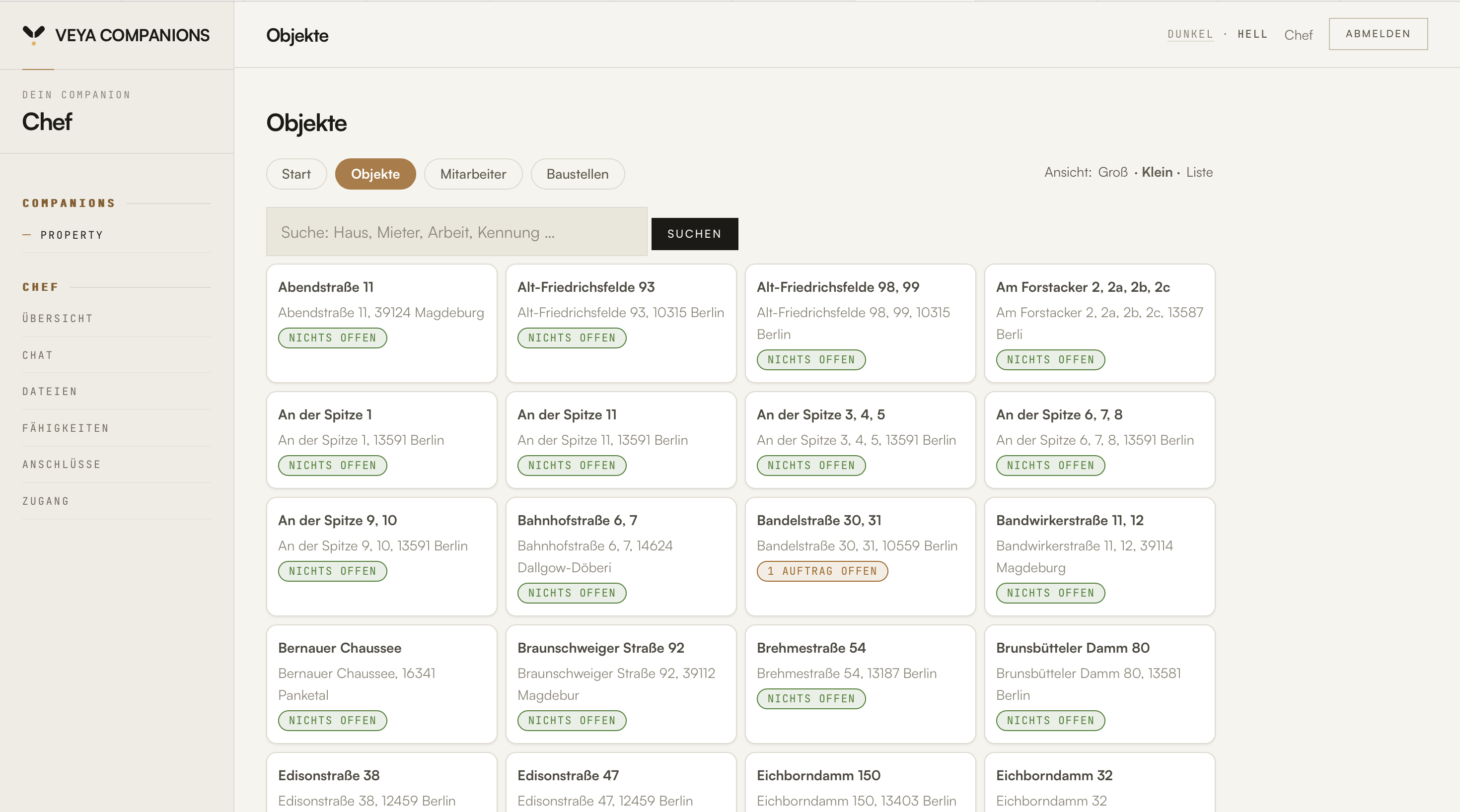
Not a concept mock-up — the running dashboard. Keep scrolling: the screen moves through five views of the business.

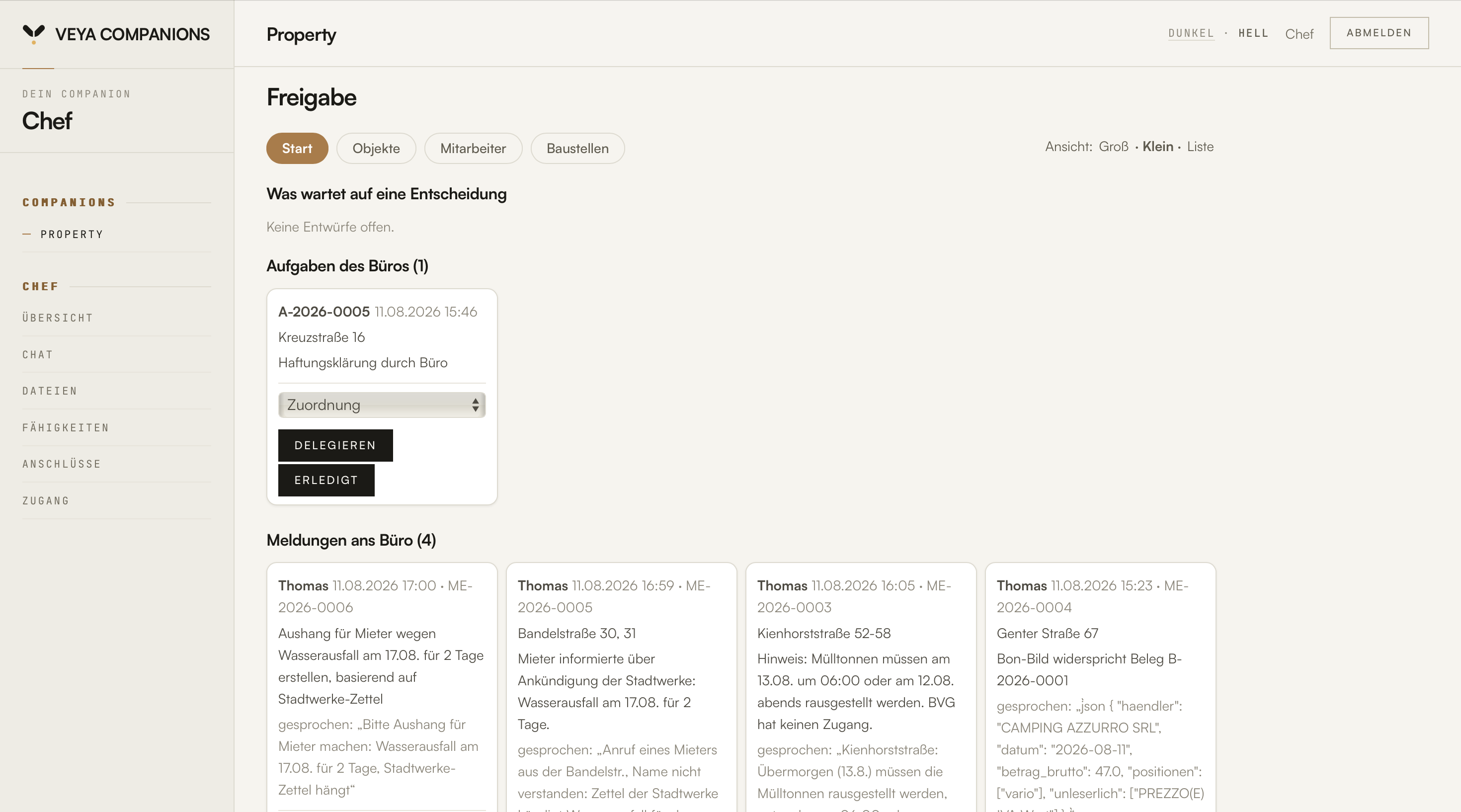
Boss — approvals

Whatever is waiting for a decision sits at the top. Below it, the reports from the field: delegate or mark done, with one click.

Buildings

Every house with its status: nothing open — or one job open. Search by house, tenant, work, identifier.

Staff

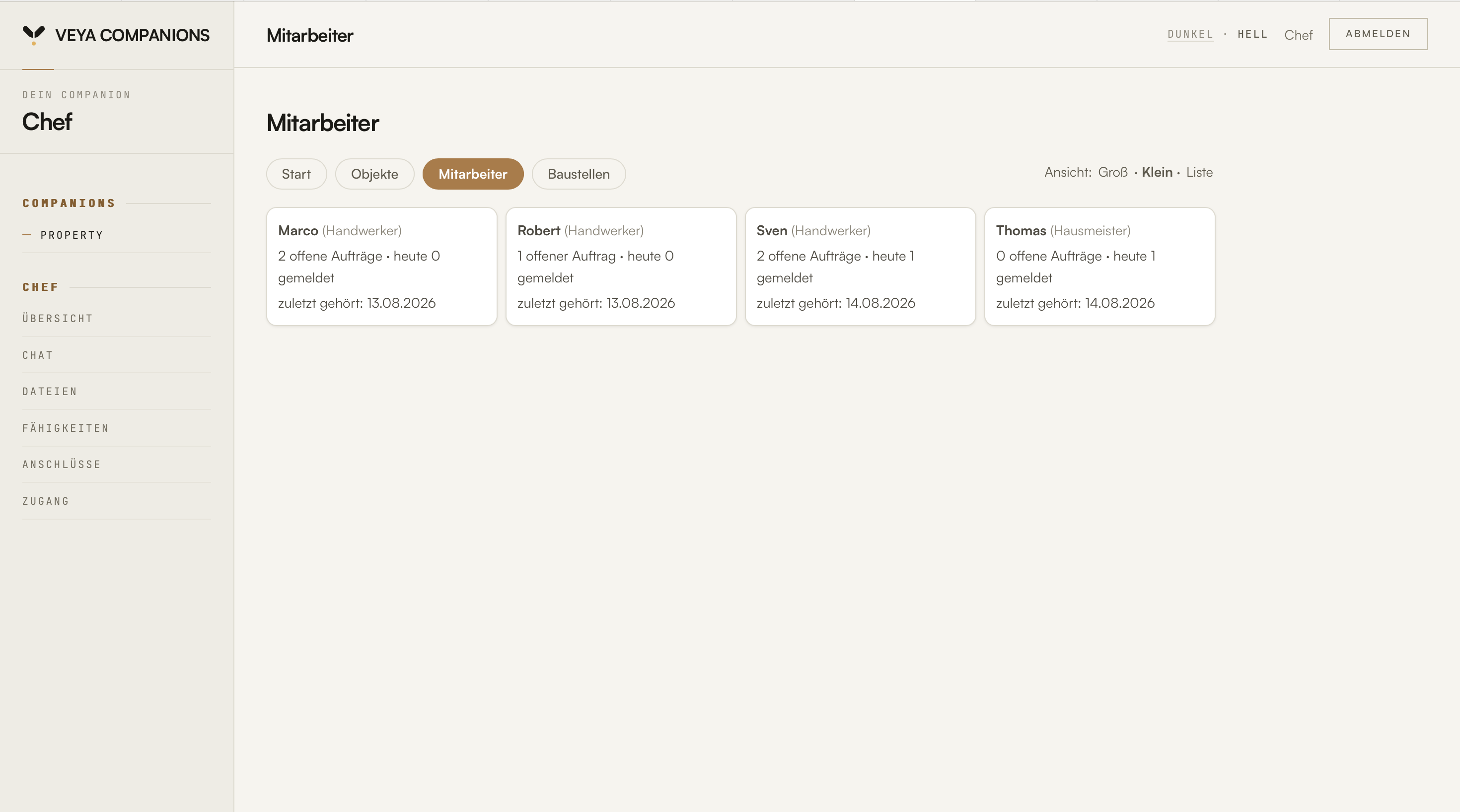
Who has what open, who has reported today, when last heard from — no location tracking, no stopwatch.

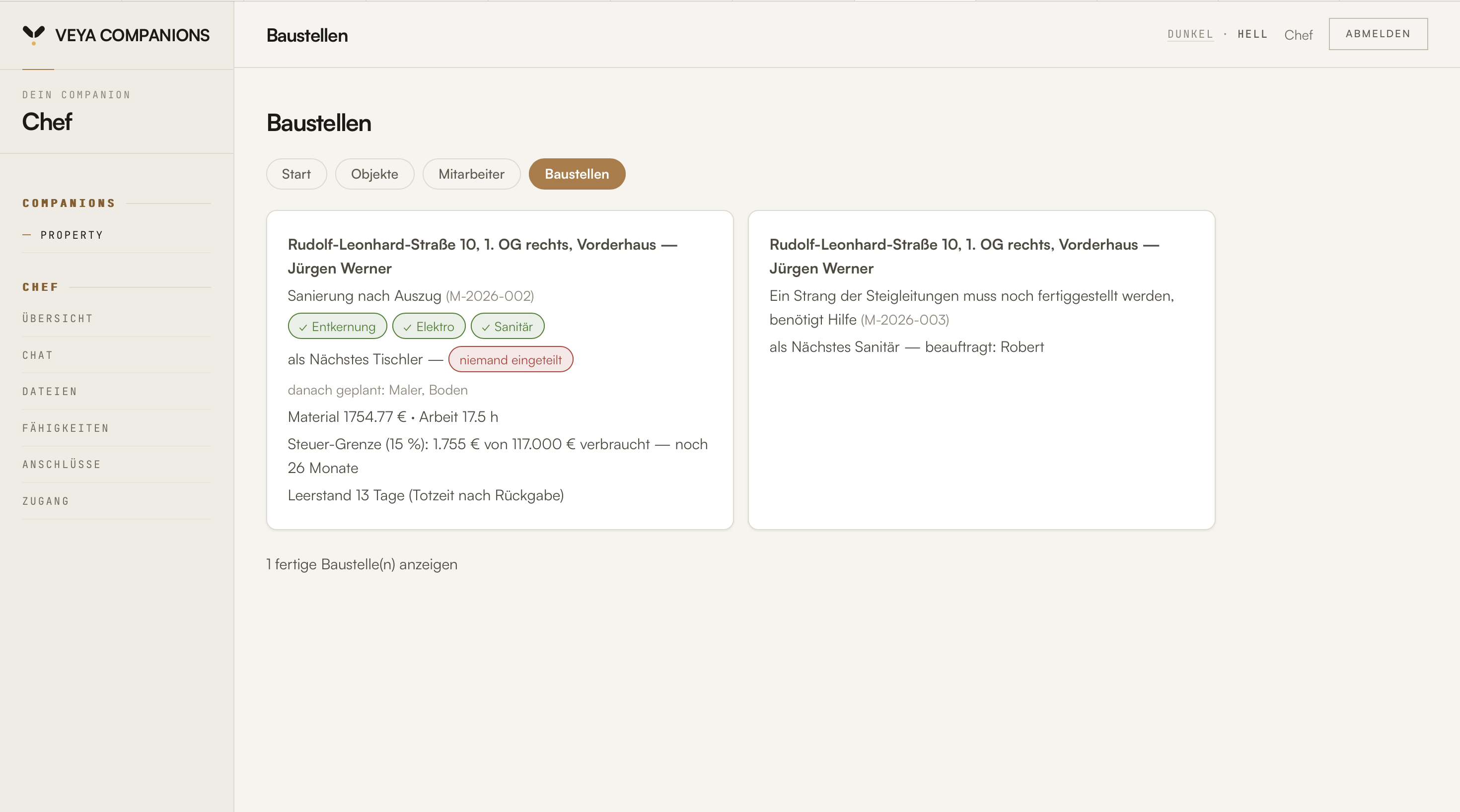
Sites

Chain of trades, material and hours, vacancy in days — all on one sheet.

Field — My day

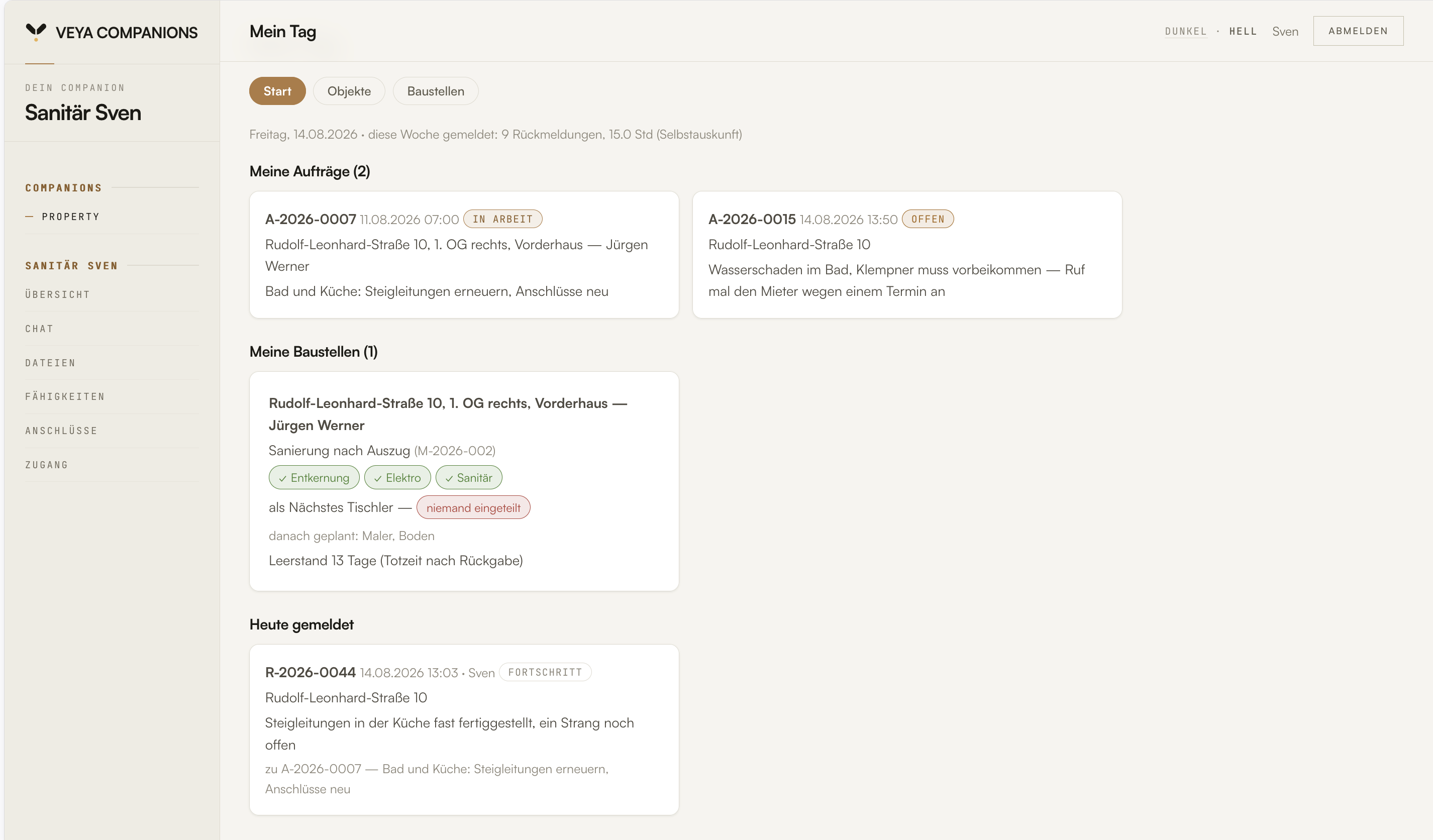
The same data, a different view: your own jobs, your own site, what you reported today — read-only, no money figures. Reporting happens in chat.

dashboard · on your server
Boss dashboard: approvals page with the office's open tasks and reports from the field Boss dashboard: buildings page with all houses and a status per building Boss dashboard: staff page with open jobs and the latest report per person Boss dashboard: sites page with chain of trades, material and labour costs Field dashboard of plumber Sven: My day with his own jobs, his own site and today's report
Red lines

What the Companion deliberately does not do.

Trust inside the business is the precondition for a tool like this being used at all. So these are not missing features — they are commitments.

No location tracking, no stopwatch

GPS tells you where the van was parked — not what happened at the house. The Companion works on self-reporting: your people tell it what they did. There is no measured time and no tracking. That is anchored in the code, not in the terms and conditions: what the Companion may not do, it cannot do.

No tax advice

Posting and classifying stay with your tax adviser — and for that, they get a clean cost breakdown per house and site from us.

No ERP promises

Your list of units comes in by file import — that works for everyone, Excel included. The cost breakdown goes to the tax adviser as a file. We promise no more than that until it runs reliably.

propertyCOMPANION runs on VYYNU Core, our own core, developed specifically for this. As a customer you can inspect every line of code on your server.

Your building log lives on a server you rent yourself — under your contract, with your access. No surprises in the small print. 

Who it's for

For businesses that own their houses
and maintain them themselves.

Made for

Small property managers with their own portfolio, housing cooperatives, municipal housing companies, private owners — businesses up to around a hundred buildings that work with their own caretakers and employed tradespeople, and spend their own money.

And if your day looks different

The same core carries other working days too. If your business needs something that isn't listed here, we develop your Companion together: the xCOMPANION. The first briefing is free.

Pricing

One price for the whole business.

No bundles, no surcharges, no tiers by number of buildings. What the propertyCOMPANION costs hangs on a single number: how many people work with it.

€3,500/ year

for teams up to 5 seats

equals €291.67 a month

Each additional seat €500 a year, equals €41.67 a month · 12-month minimum term · plus VAT

Try it for 30 days, or your money back.

The contract starts with the set-up, and payment starts then. During the first 30 days you can cancel at any time and get your money back. The twelve-month minimum term counts from the set-up. You can pay yearly or monthly; paying monthly costs no more. After the minimum term, the contract renews for another year each time, cancellable with one month's notice to the end of the term.

Starting with the whole team? Then begin with a pilot project at a fixed price, set up together, with a success criterion we agree on beforehand. It ends with a decision — and if you go ahead, the pilot fee is credited against your first year.

Get in touch Book a conversation

All in

Jobs by chat, the building log, cost allocation per house, sites with chain of trades, approvals, role dashboards. No add-on packages, no surcharges.

The base is built in

Every seat carries the base skills of the family too: email, calendar, web search, image understanding, speaking and answering by voice.

For everyone in the business

Every seat gets its own Companion and its own dashboard — on the device your people carry anyway, phone or tablet. Reporting happens by voice message via Telegram, checking happens in the dashboard, which is right there in the browser. Nothing gets installed, no device has to be set up. Plus a separate boss dashboard that brings together what belongs together in the business.

Set-up included

No setup fee, no activation fee. 60 to 90 minutes, together, on your server.

More than five seats

Each additional seat costs €500 a year, which equals €41.67 a month, with its own Companion, its own dashboard and access to the boss dashboard. No minimum purchase.

What comes on top

A small server (VPS) for around €5–10 a month, rented directly from a hoster of your choice, model costs based on usage, on average around 50 cents per seat and working day, and the voice through ElevenLabs, $6 a month on the Starter plan. Together around €20–25 a month per seat.

Common questions

What property owners ask us.

What is the propertyCOMPANION?

An AI agent for property owners with their own in-house maintenance team. Your people report by chat what they did at which house. The Companion assigns it to the building, keeps the building log and shows you in the dashboard what is open and what it cost. Not a property-management suite, not a CRM.

Who is the propertyCOMPANION for?

For small and mid-sized property owners: property managers with their own portfolio, housing cooperatives, municipal housing companies, private owners: businesses up to around a hundred buildings with their own caretakers and employed tradespeople.

Where does our data live?

The building log, the receipts and the Companion's memory live on your own server, and you can take everything with you at any time. Only the requests to the language model, which understands and sorts the reports, leave the server.

Do our tradespeople have to learn an app?

No. Reporting happens in chat, just like WhatsApp before, only that the report now lands on the building instead of in a group thread. The dashboard is read-only; anyone who only wants to report doesn't need it.

Which language model does the propertyCOMPANION use?

Always the model that, in our view, is currently the best and most up to date for the Companion. We check the market daily for what can be improved in cost and capability. Access runs through OpenRouter, a service that lets you use many models with one account. Every request carries a short summary of your memory so that it knows you. You can switch the model; your memory stays on your server.

Can the Companion do things I don't want?

It can only do what you approve. It does not release money: approvals only go through the dashboard, and the chat can neither grant nor confirm them. It asks before important steps, a stop command in the chat halts it at once, and it has no browser. These limits are in the code.

Is the propertyCOMPANION a way to monitor my staff?

No. There is no tracking and no stopwatch. Your people say themselves what they did at which house and roughly how long it took. If you have a works council, involve it early all the same, because it has a say in technical systems that could record performance.

How do our buildings and units get in?

By file import, from Excel too. Every unit gets a fixed ID; the tenant's name and location become ways to find it.

Can I photograph receipts?

Yes. A photo of the receipt is enough. The Companion checks merchant, amount and date and assigns the receipt to the house, and if a site is running there, to the site as well. It reports contradictions instead of glossing over them.

Does the propertyCOMPANION know what can be passed on to tenants?

It suggests a classification for every report: rechargeable, not rechargeable or unclear, based on a fixed table per job type. The decision is made in the office, and it is recorded. How to separate costs per house cleanly is explained on the (German) knowledge page Kosten je Haus zuordnen.

Do we need internet on the go?

Yes, for Telegram and the dashboard. In a basement without reception you still record the message; Telegram sends it as soon as there is signal again.

What does the propertyCOMPANION cost?

€3,500 a year, which equals €291.67 a month, for teams up to 5 seats, a Companion and dashboard for everyone, plus a separate boss dashboard. Each additional seat €500 a year, which equals €41.67 a month. You can pay yearly or monthly. Paying monthly costs no more. All plus VAT. The contract starts with the set-up, with a twelve-month minimum term. Within the first 30 days you can cancel and get your money back. The contract then renews for another year each time, cancellable with one month's notice to the end of the term. Add a small server (around €5–10 a month), model costs and the voice through ElevenLabs ($6 a month). Set-up is included, with no setup or activation fee: 60 to 90 minutes, together, on your server.

How does a pilot project work?

For teams that want to start together: a fixed price, set up together, with a success criterion agreed in advance. It ends with a decision meeting. Nothing quietly rolls on. If you go ahead, the pilot fee is credited against your first year. If not, we remove the Companion from your server again.

How do I cancel if I no longer need the Companion?

With an ordinary cancellation: at any time during the first 30 days, with your money back, and after the minimum term with one month's notice to the end of the term, otherwise the contract renews for another year. Write to us. Then we remove it from the server together with you.
Contact

Does your business recognise itself here?

Then write us a line about your portfolio and your team — [email protected]. We read everything ourselves and reply in English, usually within one working day — with an honest answer to whether the Companion suits your business. The set-up we do together with you, on your server.

Get in touch What it costs

As with all VYYNU COMPANIONs, the honest running costs come on top: a small server (VPS) for around €5–10 a month, rented directly from a hoster of your choice, model costs based on usage and the voice through ElevenLabs.